Important concepts
Understand multi-tenant architecture with SuperTokens
Overview
Multitenancy organizes an application into groups of users that share access to it. These groups, or tenants, can have separate authentication configuration and user pools. Each tenant can also have different sign-in methods, configured by the tenant or by you, the application developer.
For example, a SaaS application for a financial company may want to separate their users by the financial institution they represent. This might use a sign-in screen that asks for a username, password, and tenant name. The application would then route the user to their specific tenant, which could be a different database or a different collection of data within a database.
References
With SuperTokens, there are two levels of abstraction for multitenancy: Tenant and Application.
Tenant
A tenant is a group of users with shared access and specific privileges in an application. Key characteristics:
- Each tenant can have its own sign-in method. For example, one tenant can use email-password sign-in, while another can use SSO.
- Each tenant has its own user pool. One user can sign in with the same email across different tenants, and the system treats the identities as different users. You can also share a user across tenants.
- You can isolate SuperTokens authentication data further by using a different database for each tenant. Business-data isolation remains the application’s responsibility.
- Roles and permissions exist at the application level, but their mapping to users is defined at the tenant level. This means that the same user shared across tenants can have different roles / permissions, depending on the tenant they log into. It also means that you can share the same role and permission set across tenants.
- Sessions are per tenant (
appId->tenantId-> session handle) and cannot be shared across tenants. - For multiple tenants, you can run the same backend and frontend across all tenants of an app.
Each request from the frontend contains a
tenantIdidentifying that tenant to the backend, and once logged in, each session also contains that user’stenantId.
Application
The top-most level of abstraction in SuperTokens multitenancy. Key characteristics:
- Each app can have its own set of tenants and users, which can’t be shared with other apps.
- Each app needs to have its own SuperTokens backend and SuperTokens frontend SDK setup.
- User metadata is at the application level because users are also at the application level.
- When you start the core for the first time, SuperTokens creates an app (
appIdis"public") and one tenant in it (tenantId is"public"). When you create a new app, you also get a new tenant (tenantIdis"public") as part of that app created for you. - A user can be uniquely recognized by their
appId->userId. This allows the same user to be shared across tenants if required. - The identity of the user (their email for example) can be uniquely identified by
appId->tenantId-> email. This allows the same email to be used across tenants while still being treated as different users with different user IDs. The same applies to phone numbers and third-party sign-in profiles. - You can create multiple apps and tenants in the same database or in different databases.
The only restriction is that for an app, you cannot share a user across
tenantAandtenantBif the databases fortenantAandtenantBare different. In other words, a user can only be shared across tenants that use the same database.
Types of setup
Based on these abstractions, you can choose from four setup types when configuring authentication with SuperTokens.
Single tenant, single app
The default use case when you are not using the multitenancy feature.

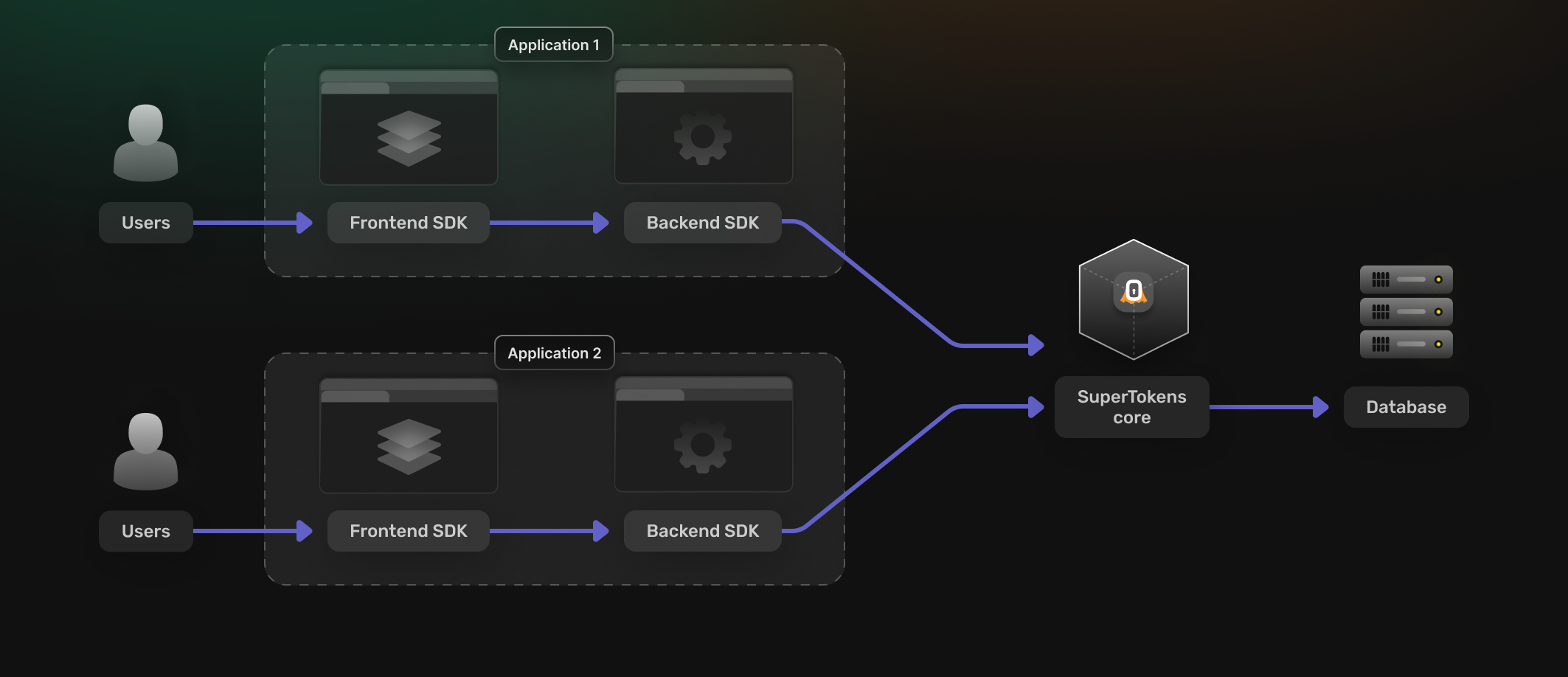
Single tenant, multi app
This is where you have multiple applications running on the same SuperTokens core instance and each application has a single user pool. This could be two different apps in your organization, or two different development environments for the same app (or some combination of this).
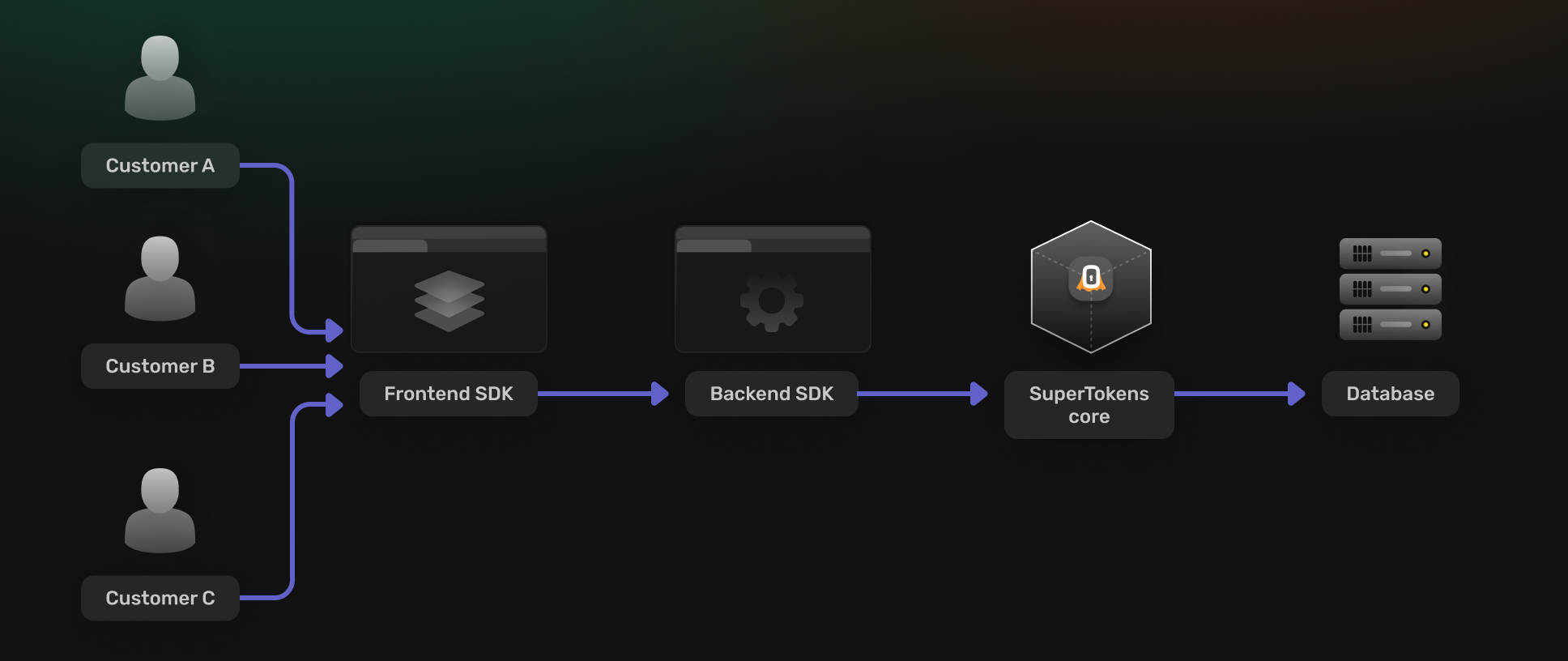
Multi tenant, single app
Different customers use the same application, but each customer has their own set of users and login methods (each customer is a unique tenant in SuperTokens).
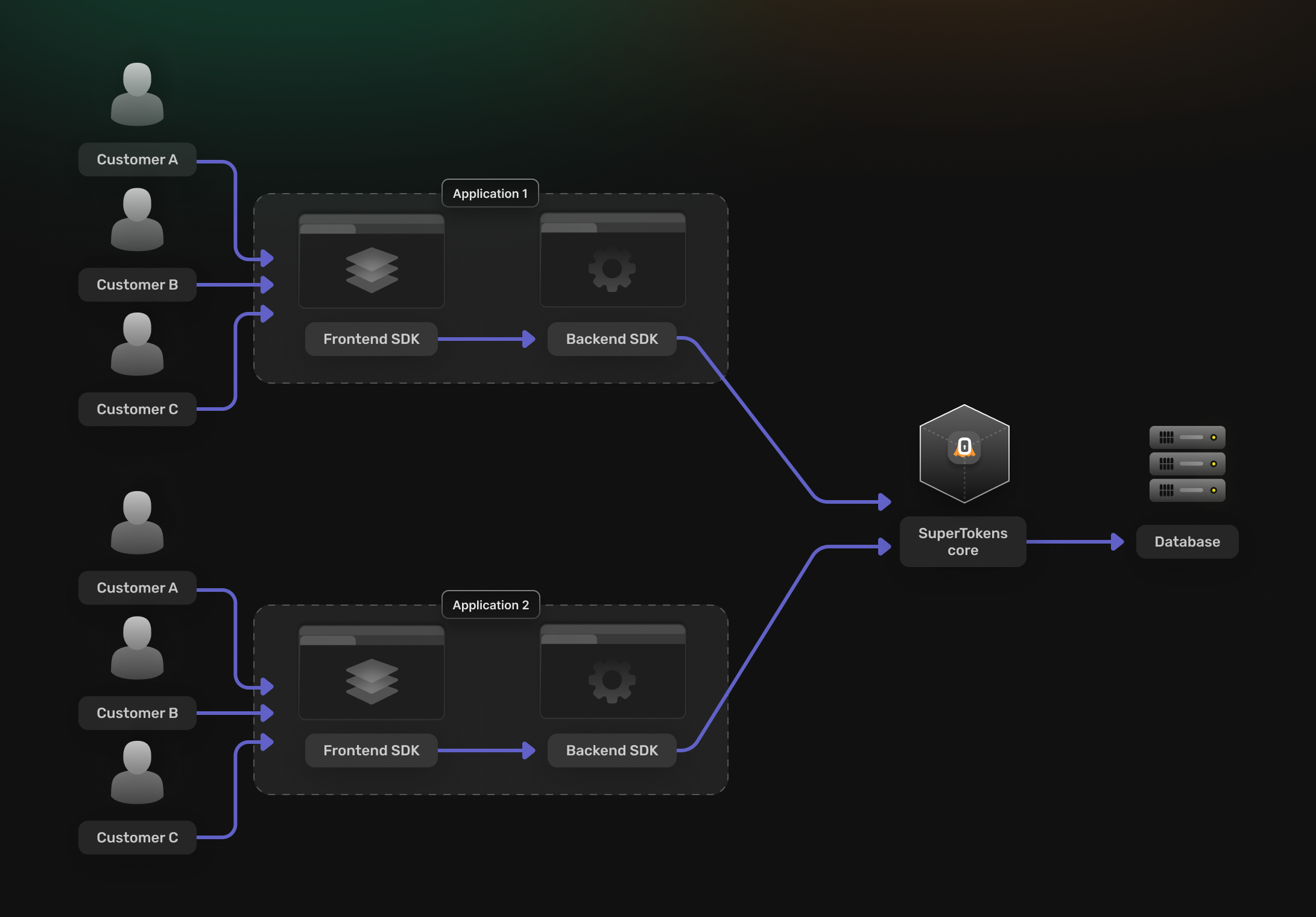
Multi tenant, multi app
Multiple applications run on the same SuperTokens core instance, and each application has its own set of tenants. This could be two different applications in your organization, or two different development environments for the same application (or some combination of this).
In a multi app, multi tenant setup: A user can be uniquely recognized by their appId -> userId.
This allows the same user to be shared across tenants if required.
The identity of the user (their email for example) can be uniquely identified by appId -> tenantId -> email.
This allows the same email to be used across tenants while still being treated as different users with different user IDs.
The same applies to phone numbers and third-party sign-in profiles.
Roles and permissions exist at the application level, but their mapping to users is defined at the tenant level.
This means that the same user shared across tenants can have different roles / permissions, depending on the tenant they log into.
It also means that you can share the same role and permission set across tenants.
Sessions are per tenant (appId -> tenantId -> session handle) and cannot be shared across tenants.
User metadata is at the application level because users are also at the application level.